Overview
Chunking is the process of breaking down large documents into smaller, manageable pieces (chunks) that fit within an LLM’s context window.
It adheres to the Goldilocks Principle:
- Too Small: You lose context. (e.g., “He said yes.” → Who is he? Yes to what?)
- Too Big: You introduce noise, dilute specific information, and hit token limits.
Core Strategies
1. Fixed-Size Chunking
The most basic approach. Splits text after a specific number of characters or tokens.
- Mechanism:
if len(chunk) > limit: split() - Overlap: Essential to prevent cutting words in half at the boundary.
- Pros: computationally cheap, simple to implement.
- Cons: Breaks semantic meaning mid-sentence.
- Production Readiness: Low.
2. Recursive Character Chunking
The distinct standard for most text-based RAG applications. It tries to split on natural boundaries first.
- Mechanism: It looks for separators in a specific order:
["\n\n", "\n", " ", ""].- Can I split by paragraphs (
\n\n)? - If still too big, try lines (
\n). - If still too big, try spaces.
- Can I split by paragraphs (
- Pros: Respects document structure and keeps paragraphs together.
- Cons: Might still break semantic flow if a topic spans multiple paragraphs.
- Production Readiness: High (The default choice).
3. Document Specific Chunking
Leverages the structure of known file types.
- Markdown: Splits by headers (
#,##). Ensures a Header and its contents stay together. - Code: Splits by class and function definitions (
class,def). - Pros: Extremely high context preservation.
- Production Readiness: High (Must-have for specific domains).
4. Semantic Chunking
Uses the meaning of the text to decide where to split, rather than arbitrary characters. It attempts to keep topically related sentences in the same chunk.
Algorithm
- Sentence Splitting: Break the document into individual sentences.
- Embedding: Calculate the vector embedding for every sentence ().
- Similarity Check: exact sequential comparison. Calculate cosine similarity between and .
- Thresholding:
- Plot the similarities as a graph.
- Identify “valleys” (sudden drops in similarity) which represent a change in topic.
- Split the chunk at these valleys.
Pros
- High coherence.
- No “mid-sentence” cuts. Excellent for messy transcripts.
Cons
- Latency: Requires embedding calls before you even start indexing.
- Noise: Single outlier sentences can trigger premature splits.
- Production Readiness: Use for offline indexing pipelines where speed is not critical.
5. Parent Document Retrieval (Small-to-Big)
Gold Standard for production. It decouples the Indexing Unit (what you search) from the Retrieval Unit (what you send to the LLM).
Architecture
- Vector Store: Contains small, dense chunks (e.g., single sentences). Optimized for high-precision search.
- Doc Store (Key-Value): Contains the original larger documents or windows.
Main Flavors
- Full Parent Retrieval:
- You stick a “Parent ID” on every small chunk.
- When a small chunk is retrieved, you fetch the entire parent document (or a large 500-token window) from the Doc Store.
- Sentence Window Retrieval:
- You index a single sentence.
- Upon retrieval, you fetch a pre-calculated window of 5 sentences before and 5 after.
Why it Works
Embedding a 500-token paragraph “dilutes” the vector. The vector represents the average meaning of the whole paragraph. If the answer is in sentence #3, it might get lost. By embedding sentence #3 directly, you get a sharp vector match. By returning the whole paragraph, you give the LLM the context it needs to reason.
- Production Readiness: Very High. State of the art for minimizing hallucinations.
Comparison & Decision Framework
Strategy vs Trade-offs
| Strategy | Computational Cost | Semantic Preservation | Indexing Speed | Best Use Case |
|---|---|---|---|---|
| Fixed-Size | Lowest | Poor | Fastest | MVP, Uniform raw text |
| Recursive | Low | Good | Fast | General Purpose Documents |
| Markdown/Code | Low | Excellent | Fast | Technical Documentation, Codebases |
| Semantic | High | Excellent | Slow | Noisy, unstructured essays/transcripts |
| Parent Doc | Medium | Excellent | Medium | High-accuracy Production RAG |
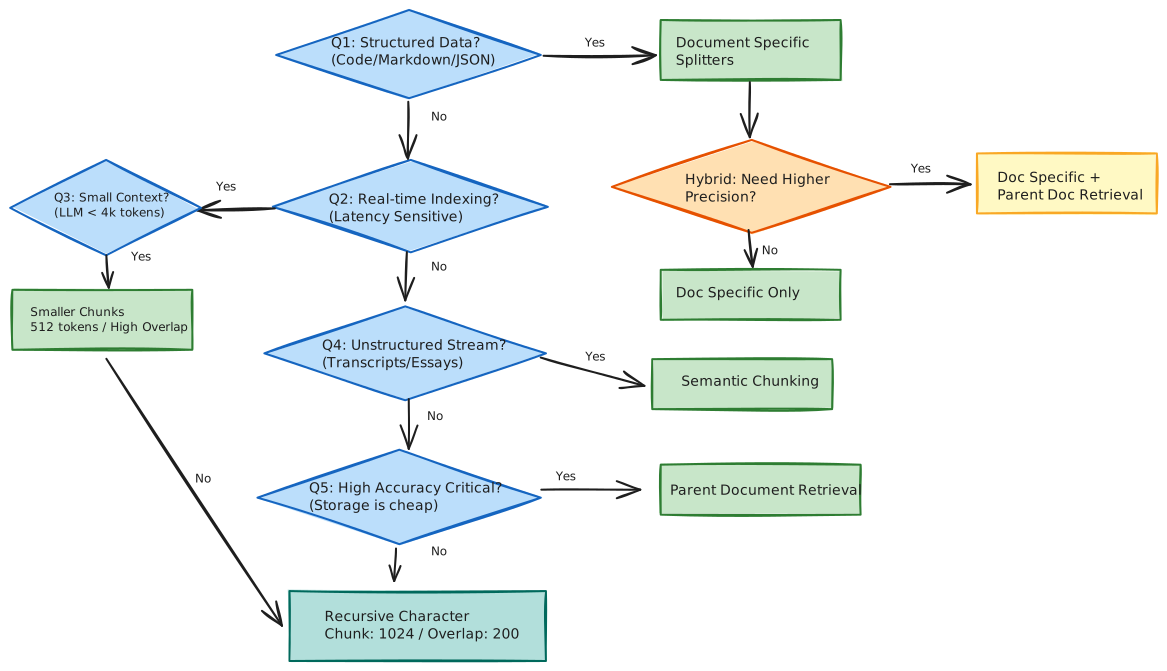
Decision Flowchart
Resources
- Article: 5 Levels of Text Splitting (Excellent in-depth python notebook)
- Visualizer: LangChain Chunk Visualizer
Back to: 01 - RAG Index