Overview
A Vector Database is a specialized storage system designed to efficiently store, index, and retrieve high-dimensional vectors (embeddings). In the context of RAG pipelines, vector databases serve as the core retrieval engine, enabling semantic search by finding vectors that are geometrically close to a query vector in embedding space.
Unlike traditional databases that search by exact matches (SQL WHERE clauses) or keyword matching, vector databases perform similarity search: given a query vector , find the vectors in the database most similar to .
Why dedicated vector databases? The naive approach of computing distances between the query vector and every stored vector in the database does not scale. For a database with vectors and dimensionality , a brute-force search requires distance computations per query. At million vectors and dimensions, this is approximately 15 billion operations per query, making it impractical for real-time applications.
Vector databases solve this through Approximate Nearest Neighbor (ANN) algorithms, which trade a small amount of recall for orders-of-magnitude speedups.
Key Concepts
Distance Metrics
Vector databases compute similarity using distance (or similarity) metrics. The choice of metric affects both the results and the indexing algorithm performance.
| Metric | Formula | Range | Use Case |
|---|---|---|---|
| Cosine Similarity | [-1, 1] | Normalized embeddings (most common for LLM embeddings) | |
| Euclidean (L2) | [0, ∞) | When magnitude matters | |
| Dot Product | (-∞, ∞) | Pre-normalized vectors (equivalent to cosine) | |
| Manhattan (L1) | [0, ∞) | Sparse vectors, grid-like distances |
For unit-normalized vectors (norm = 1), cosine similarity equals dot product. Most embedding models (OpenAI, Cohere, BGE) output normalized embeddings, so these are interchangeable in practice.
Exact vs Approximate Nearest Neighbors
| Approach | Description | Time Complexity | Recall | Use Case |
|---|---|---|---|---|
| Exact (Brute-force) | Compare query to all vectors | 100% | Small datasets (<10K vectors) | |
| Approximate (ANN) | Use index structures to prune search | to | 95-99% | Production scale |
ANN algorithms sacrifice some recall (the percentage of true nearest neighbors found) for dramatic speed improvements. A well-tuned ANN index achieves 95-99% recall with 100-1000x speedup over brute-force.
The Recall vs Speed Trade-off
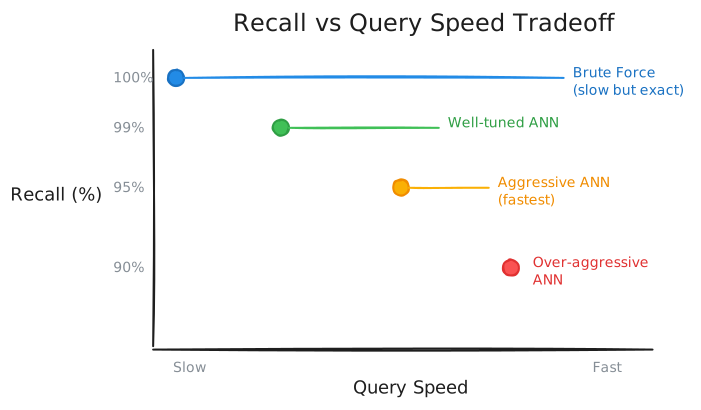
Production systems can typically target 95-99% recall, which means 1-5% of queries may miss the “true” nearest neighbor but find the second or third closest instead. For RAG applications, this is usually acceptable since we retrieve top-K (typically 5-20) results anyway.
ANN Index Algorithms
Different indexing strategies trade off index build time, query speed, memory usage, and recall. The choice depends on your scale and constraints.
Must Read: https://www.pinecone.io/learn/series/faiss/vector-indexes/
HNSW (Hierarchical Navigable Small World)
Most popular algorithm for production vector databases.
Must Read: https://www.pinecone.io/learn/series/faiss/hnsw/
Characteristics
| Aspect | Details |
|---|---|
| Query Speed | Very fast () |
| Memory Usage | High (graph structure + original vectors) |
| Index Build Time | Medium-slow |
| Update Support | Good (can add/remove without full rebuild) |
| Best For | Read-heavy workloads, high recall requirements |
IVF (Inverted File Index)
IVF clusters vectors into partitions (cells), then searches only relevant partitions at query time. It is similar to a library with organized sections.
Must Read: https://blog.dailydoseofds.com/p/approximate-nearest-neighbor-search
Key Parameters
| Parameter | Description | Trade-off |
|---|---|---|
| nlist | Number of clusters | More = finer partitions, slower build |
| nprobe | Clusters to search at query time | More = better recall, slower query |
Heuristics:
nlist ≈ sqrt(N)for balanced partitioningnprobe ≈ nlist/10as a starting point (tune for recall)
Characteristics
| Aspect | Details |
|---|---|
| Query Speed | Fast, but depends on nprobe |
| Memory Usage | Lower than HNSW (no graph overhead) |
| Index Build Time | Fast (just K-means + assignment) |
| Update Support | Poor (rebalancing needed for new clusters) |
| Best For | Large datasets, memory-constrained environments |
PQ (Product Quantization)
PQ compresses vectors by dividing them into subvectors and quantizing each independently, dramatically reducing memory usage. It is a lossy compression technique.
Must Read: https://www.pinecone.io/learn/series/faiss/product-quantization/
Characteristics
| Aspect | Details |
|---|---|
| Query Speed | Medium (quantization lookup overhead) |
| Memory Usage | Very low (10-100x compression) |
| Accuracy | Lower (lossy compression) |
| Index Build Time | Medium (codebook training) |
| Best For | Memory-constrained, very large datasets |
Compound Indices (IVF-PQ, HNSW+PQ)
Production systems can combine algorithms for best results.
IVF-PQ (FAISS Default for Large Scale)
https://towardsdatascience.com/similarity-search-with-ivfpq-9c6348fd4db3/
Combines IVF clustering with PQ compression:
- Cluster vectors (IVF) to reduce search space
- PQ-compress vectors within each cluster
Characteristics: Fast, low memory, moderate recall. Good for billion-scale datasets.
HNSW+PQ
https://weaviate.io/blog/ann-algorithms-hnsw-pq
HNSW graph navigation with PQ-compressed vectors:
- Use HNSW graph structure for navigation
- Store PQ codes instead of full vectors
- Optional: re-rank with original vectors for top candidates
Characteristics: Faster than pure HNSW, retains good recall, much lower memory.
Index Algorithm Comparison
| Algorithm | Query Speed | Memory | Recall | Build Time | Updates | Best For |
|---|---|---|---|---|---|---|
| Brute-Force | Slow | Low | 100% | None | Easy | Tiny datasets |
| HNSW | Very Fast | High | 98-99% | Medium | Good | Production, quality-critical |
| IVF | Fast | Medium | 90-95% | Fast | Poor | Large scale, moderate quality |
| PQ | Medium | Very Low | 85-95% | Medium | Medium | Memory-constrained |
| IVF-PQ | Fast | Low | 90-97% | Medium | Poor | Billion-scale |
| HNSW+PQ | Fast | Medium | 95-98% | Medium | Medium | Balanced scale + quality |
Rule of Thumb:
- < 100K vectors: HNSW or even brute-force
- 100K - 10M vectors: HNSW (if memory allows), else IVF
- 10M - 1B vectors: IVF-PQ or HNSW+PQ
-
1B vectors: Specialized solutions (ScaNN, DiskANN)
Vector Database Landscape
Categories
1. Purpose-Built Vector Databases Designed from the ground up for vector search, with enterprise features.
2. Vector Search Libraries Algorithms you run yourself (no managed infrastructure).
3. Traditional Databases with Vector Extensions Add vector search to existing database infrastructure.
Popular Options
| Database | Type | Best For | Key Features |
|---|---|---|---|
| Pinecone | Managed SaaS | Production, zero-ops | Serverless, automatic scaling, hybrid search |
| Weaviate | Open-source/Cloud | Hybrid search, semantic features | Built-in hybrid search, modules for ML |
| Qdrant | Open-source/Cloud | Filtering, payload storage | Advanced filtering, payload indexing |
| Milvus | Open-source/Cloud | Scale, GPU acceleration | Billion-scale, GPU support |
| Chroma | Open-source | Prototyping, simplicity | Simple API, LangChain integration |
| FAISS | Library | Performance, research | Facebook’s library, state-of-art algorithms |
| pgvector | Postgres extension | Existing Postgres users | SQL integration, ACID transactions |
| Elasticsearch | Search platform | Full-text + vector hybrid | Mature ecosystem, hybrid search |
Detailed Comparison
Pinecone (Managed SaaS)
Strengths:
- Fully managed, serverless architecture
- Automatic scaling and replication
- Built-in hybrid search (sparse + dense)
- Metadata filtering with vector search
- Strong consistency guarantees
Weaknesses:
- Vendor lock-in
- Higher cost at scale
- Less control over index parameters
Best For: Production applications where operational simplicity is valued over cost optimization. Teams without dedicated infrastructure expertise.
Weaviate (Open-source)
Strengths:
- Built-in hybrid search (BM25 + vectors)
- Modular architecture (plug in different vectorizers)
- GraphQL API
- Active open-source community
- Self-hosted or managed cloud options
Weaknesses:
- Higher memory footprint than some alternatives
- Learning curve for module system
Best For: Hybrid Search applications requiring both keyword and semantic search in one query.
Qdrant (Open-source)
Strengths:
- Advanced filtering (payload indexing)
- Efficient on-disk storage
- Rust implementation (performance + safety)
- Straightforward REST/gRPC API
- Strong consistency options
Weaknesses:
- Smaller ecosystem than Weaviate/Milvus
- Fewer built-in integrations
Best For: Applications requiring complex metadata filtering alongside vector search. When you need to filter by .metadata.author == "John" AND .metadata.year > 2020 efficiently.
Milvus (Open-source)
Strengths:
- Designed for billion-scale
- GPU acceleration support
- Multiple index types (HNSW, IVF, DiskANN)
- Separation of storage and compute
- Strong enterprise features
Weaknesses:
- Operational complexity
- Heavier resource requirements
- Steeper learning curve
Best For: Very large scale deployments (100M+ vectors). Enterprise environments with dedicated infrastructure teams.
Chroma (Open-source)
Strengths:
- Extremely simple API
- Embedded mode (no server needed)
- First-class LangChain/LlamaIndex integration
- Fast iteration for prototypes
- Lightweight
Weaknesses:
- Not designed for production scale
- Limited query features
- No native hybrid search
Best For: Prototyping, local development, small projects. Getting started with RAG quickly.
FAISS (Library)
Strengths:
- State-of-the-art algorithms (fastest implementations)
- Multiple index types (brute-force to billion-scale)
- GPU support
- Well-documented, well-researched
- Zero dependencies beyond NumPy
Weaknesses:
- No managed infrastructure
- No persistence (save/load manually)
- No metadata filtering (vectors only)
- No replication/sharding built-in
Best For: Research, performance-critical applications, embedding into larger systems. When you need maximum control.
pgvector (PostgreSQL Extension)
Strengths:
- SQL interface (familiar)
- ACID transactions
- Combine with relational data
- Use existing Postgres infrastructure
- No separate vector database needed
Weaknesses:
- Performance ceiling at scale
- Limited to Postgres ecosystem
- Fewer index options than specialized DBs
Best For: Applications already using PostgreSQL that need to add vector search without adding infrastructure. When you need transactions across vector and relational data.
Choosing a Vector Database
| Requirement | Recommended Options |
|---|---|
| Quick prototype | Chroma, FAISS |
| Production with minimal ops | Pinecone |
| Hybrid search (keyword + semantic) | Weaviate, Pinecone |
| Complex metadata filtering | Qdrant, Milvus |
| Existing Postgres | pgvector |
| Billion-scale | Milvus, ScaNN |
| On-premise / air-gapped | Milvus, Qdrant, Weaviate (self-hosted) |
| Full control over algorithms | FAISS |
| GPU acceleration | Milvus, FAISS |
Integration with RAG Pipelines
Indexing Flow
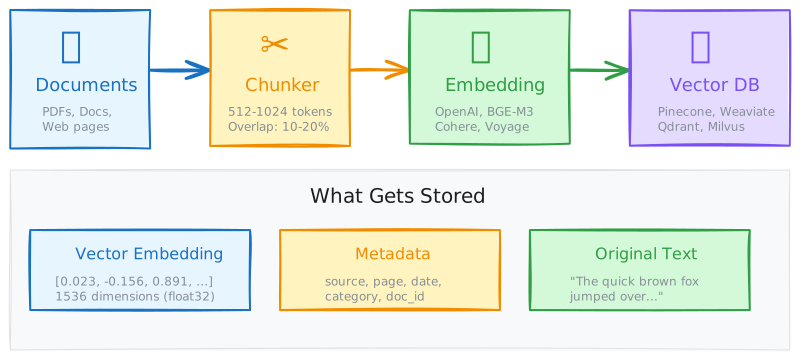
Query Flow
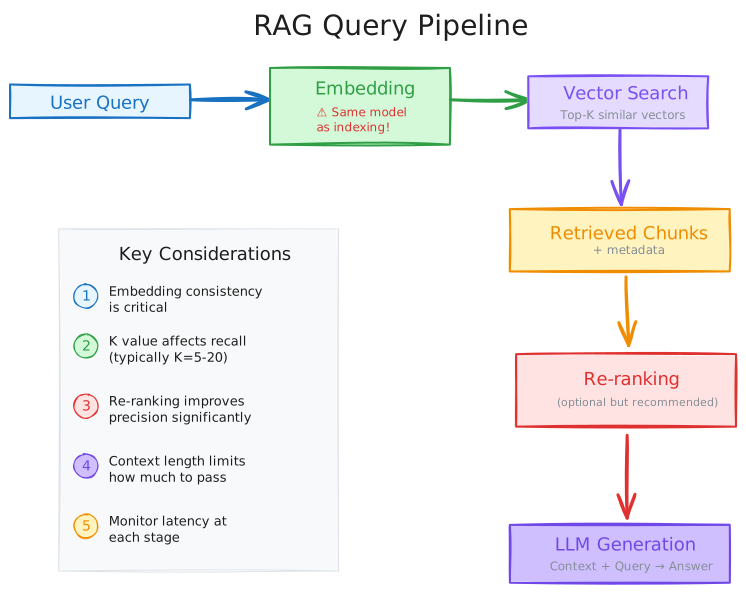
Metadata Strategies
Storing metadata alongside vectors enables powerful filtering:
index.upsert(vectors=[
    {
        "id": "chunk_001",
        "values": embedding_vector,  # [0.1, 0.2, ..., 0.8]
        "metadata": {
            "source": "annual_report_2024.pdf",
            "page": 12,
            "section": "Financial Overview",
            "date": "2024-03-15",
            "author": "CFO",
            "chunk_text": "Revenue increased by 15%..."
        }
    }
])

# Query with filter: semantic search + metadata constraint
results = index.query(
    vector=query_embedding,
    top_k=10,
    filter={
        "source": {"$eq": "annual_report_2024.pdf"},
        "date": {"$gte": "2024-01-01"}
    }
)
Filtering Strategies:
- Pre-filtering: Apply metadata filter before vector search (reduces search space)
- Post-filtering: Vector search first, then filter results (simpler but slower)
Most production databases use pre-filtering for efficiency.
Practical Application
Scaling Considerations
| Scale | Vectors | Memory | Recommended Approach |
|---|---|---|---|
| Tiny | < 10K | < 1 GB | Chroma embedded, brute-force |
| Small | 10K - 100K | 1-10 GB | Single-node HNSW (Chroma, Qdrant) |
| Medium | 100K - 10M | 10-100 GB | Managed (Pinecone) or self-hosted cluster |
| Large | 10M - 1B | 100 GB - 10 TB | Distributed (Milvus cluster), IVF-PQ |
| Massive | > 1B | > 10 TB | Specialized (ScaNN, DiskANN, custom sharding) |
Memory Estimation
Rough estimation for HNSW memory usage:
Where:
- = number of vectors
- = embedding dimension
- = HNSW edge count parameter
- 4 bytes per float32 dimension
- 8 bytes per neighbor pointer, 2 directions (bidirectional edges)
For Example: 10M vectors, 1536 dimensions, M=16:
Common Pitfalls
1. Mismatched Embedding Models
Problem: Indexing with one embedding model, querying with another.
Why It Fails: Different models produce incompatible vector spaces. A vector from OpenAI text-embedding-3-small is meaningless when compared to a vector from sentence-transformers/all-MiniLM-L6-v2.
Solution: Always use the same embedding model for indexing and querying. Store the model name as metadata.
2. Ignoring Index Tuning
Problem: Using default parameters for all workloads.
Why It Matters: Defaults optimize for general cases. Your recall/speed requirements may differ significantly.
Solution: Benchmark with your actual data. Tune ef_search (HNSW) or nprobe (IVF) based on recall targets.
3. Forgetting Metadata Indexing
Problem: Storing metadata but not indexing it for filtering.
Why It Matters: Unindexed metadata requires post-filtering (scan all results), negating speed benefits.
Solution: Explicitly create indexes on frequently-filtered fields. Most databases require this configuration.
4. Stale Indices
Problem: Documents update but vector indices do not.
Why It Matters: RAG returns outdated information, potentially causing incorrect answers.
Solution: Implement index refresh pipelines. Track document versions. Consider incremental updates vs. full rebuilds based on update frequency.
Advanced Topics
Hybrid Search in Vector Databases
Several vector databases support Hybrid Search natively, combining vector similarity with keyword (BM25) search:
| Database | Hybrid Support | Implementation |
|---|---|---|
| Pinecone | Yes | Sparse-dense vectors in same query |
| Weaviate | Yes | BM25 + vector fusion (configurable) |
| Qdrant | Partial | Requires separate text index |
| Milvus | Yes | Scalar + vector composite index |
| pgvector | Via Postgres | pg_trgm + pgvector separately |
Multi-Tenancy
For SaaS applications serving multiple customers:
Approach 1: Metadata-Based Isolation
- Single index, filter by
tenant_idmetadata - Simple, but potential data leakage risk
Approach 2: Namespace/Collection Separation
- Separate namespace per tenant
- Better isolation, more overhead
Approach 3: Database-per-Tenant
- Full isolation
- Highest overhead, best security
Quantization for Cost Reduction
Use quantized (lower precision) vectors to reduce costs:
| Precision | Bytes per Dimension | Memory Savings |
|---|---|---|
| float32 | 4 | Baseline |
| float16 | 2 | 50% |
| int8 | 1 | 75% |
| binary | 1/8 | 96% |
Trade-off: Lower precision = lower recall. For many RAG use cases, int8 quantization can retain 95%+ recall at 75% memory savings.
Comparisons
Vector Database vs Traditional Database
| Aspect | Vector Database | Traditional RDBMS |
|---|---|---|
| Query Type | Similarity (nearest neighbor) | Exact match (WHERE clauses) |
| Index Structure | ANN graphs/clusters | B-trees, hash indexes |
| Data Model | Vectors + metadata | Tables, rows, columns |
| Typical Operation | ”Find similar to X" | "Find where X = Y” |
| Consistency | Often eventual | ACID transactions |
| Scale Pattern | Specialized sharding | Mature horizontal scaling |
Vector Database vs Search Engine (Elasticsearch)
| Aspect | Vector Database | Elasticsearch |
|---|---|---|
| Primary Strength | Semantic similarity | Full-text search (BM25) |
| Vector Support | Native, optimized | Added feature (k-NN plugin) |
| Hybrid Search | Varies | Excellent (text + vectors) |
| Operational Maturity | Growing | Very mature |
| Ecosystem | RAG/ML focused | Enterprise search focused |
Resources
Documentations
- Pinecone Learning Center - Excellent conceptual explanations
- FAISS Wiki - Detailed algorithm documentation
- Weaviate Documentation
- Qdrant Documentation
Papers
- Efficient and robust approximate nearest neighbor search using Hierarchical Navigable Small World graphs (HNSW)
- Product Quantization for Nearest Neighbor Search
- Billion-scale similarity search with GPUs (FAISS)
- ScaNN: Efficient Vector Similarity Search - Google’s approach
Others
Benchmarks
- ANN Benchmarks - Standard benchmark for ANN algorithms
- VectorDBBench - Compare vector databases
Back to: 01 - RAG Index